


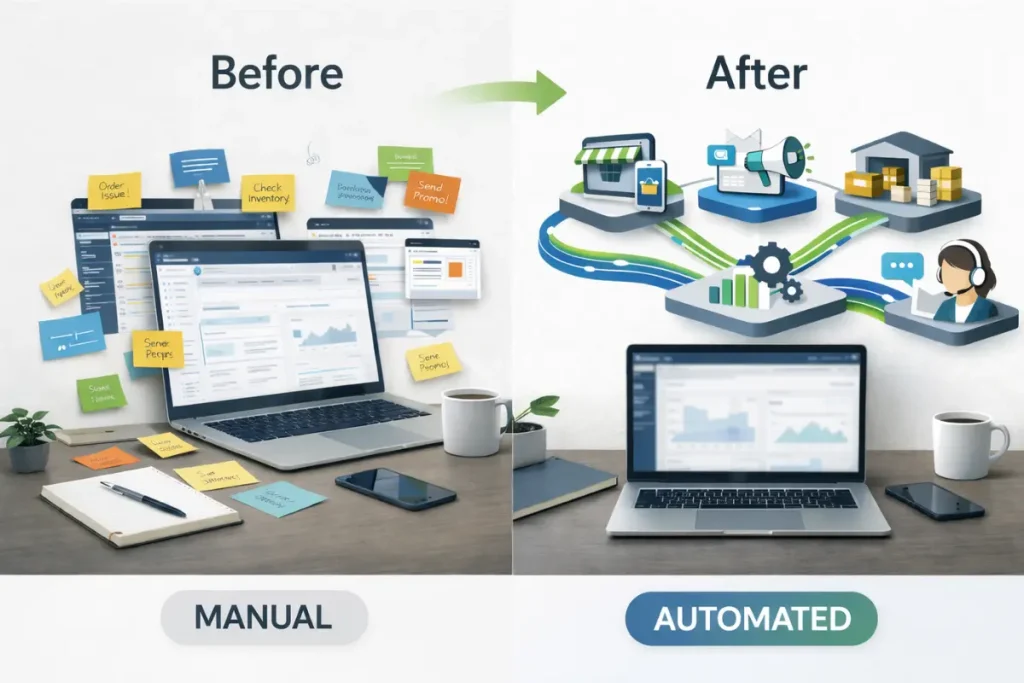
I’ve spent years watching online store owners drown in operational tasks that could run themselves. The irony is sharp: you build a business to create freedom, then spend 12 hours a day manually updating inventory, copying customer data between platforms, and writing the same email responses.
Ecommerce automation tools exist to fix this. Not by replacing your judgment, but by handling the repetitive execution that consumes your capacity for strategic work. The right automation stack doesn’t just save time—it creates operational leverage that lets you scale without proportionally scaling your workload.
But here’s what most tool roundups miss: automation without structure creates a different kind of chaos. You need tools that integrate into coherent workflows, not isolated solutions that add complexity. The best ecommerce automation tools work together as a system, reducing cognitive load rather than fragmenting your attention across disconnected platforms.
This guide covers 21 tools I’ve analyzed for their ability to automate core ecommerce operations. Each serves a specific function within your broader automation framework. Some handle customer communication, others manage inventory synchronization, and several address the marketing workflows that typically consume disproportionate time.
Marketing Automation Platforms That Handle Multi-Channel Campaigns
You’re likely spending 15-20 hours weekly on marketing tasks that follow predictable patterns. Email sequences for abandoned carts. Social media scheduling. Customer segmentation based on purchase behavior. These workflows don’t require your creative input every time they execute—they require your strategic design once, then systematic execution forever.
Klaviyo dominates email and SMS automation for ecommerce specifically because it treats customer data as the foundation of marketing decisions. The platform pulls purchase history, browsing behavior, and engagement patterns into segmentation rules that trigger appropriate messaging automatically. When someone abandons a cart, Klaviyo doesn’t just send a generic reminder—it can reference the specific products, calculate optimal send timing based on past customer behavior, and adjust messaging based on customer lifetime value. The predictive analytics identify customers likely to churn or make their next purchase, letting you automate retention campaigns that feel personalized.
Omnisend offers similar multi-channel automation with particularly strong workflows for stores that sell across email, SMS, and push notifications simultaneously. The workflow builder lets you create branching campaigns that adjust based on customer actions—if someone clicks the email but doesn’t purchase, they enter a different sequence than someone who ignores it entirely. For stores running regular promotions or launches, the pre-built automation templates reduce the setup time significantly.
ActiveCampaign brings more sophisticated marketing automation for stores that need complex conditional logic in their campaigns. The automation maps look like flowcharts because that’s exactly what they are—visual representations of decision trees that route customers through different experiences based on their behavior, attributes, and engagement history. If you’re selling products that require education or longer consideration cycles, ActiveCampaign’s ability to score leads and trigger sales notifications gives your team intelligence about who needs attention now versus who’s still researching.
These platforms eliminate the manual work of campaign execution, but they require strategic input on segmentation logic and messaging strategy. The leverage comes from designing systems that run continuously without your involvement. If you’re still manually sending promotional emails or copying customer lists between platforms, you’re operating below the efficiency threshold these tools enable.
Understanding broader ecommerce automation workflows helps you see how marketing automation fits into your complete operational system rather than functioning as an isolated capability.
Customer Service Automation Tools That Scale Support Without Hiring
Customer service queries follow patterns. The same questions arrive repeatedly: shipping timeframes, return policies, order status checks, product specifications. Answering these manually makes sense when you’re processing 10 orders weekly. At 100 orders, it becomes a significant time cost. At 1,000 orders, it requires dedicated staff.
Gorgias integrates customer service directly with your ecommerce platform, pulling order data, customer history, and product information into the support interface. When a customer asks about their order, your support team (or you) sees the complete context without switching between systems. The automated responses handle common questions immediately, while the macro library lets you send detailed answers with two clicks instead of rewriting the same explanation for the fortieth time. Revenue attribution tracking shows which support interactions lead to sales, turning customer service from a cost center into a measurable revenue activity.
Zendesk provides more comprehensive ticketing automation for stores that need multi-channel support across email, chat, social media, and phone. The routing rules assign tickets to specific team members based on topic, priority, or customer segment. Automated triggers escalate unresolved tickets, send follow-up requests, and close resolved conversations without manual oversight. The self-service knowledge base reduces ticket volume by letting customers find answers independently, while the analytics identify recurring issues that might indicate product or process problems.
Re:amaze combines customer service with marketing automation, letting you turn support conversations into sales opportunities. The chatbot qualifies visitors, answers routine questions, and routes complex inquiries to human agents. The shared inbox keeps your team coordinated across all communication channels, while the automated workflows can trigger cart abandonment sequences, request reviews, or send order updates without manual intervention.
Customer service automation isn’t about removing the human element—it’s about removing the human element from tasks that don’t benefit from human judgment. Computers excel at retrieving order status. Humans excel at handling upset customers or complex product questions. The automation handles the retrieval so you can focus on the judgment.
Broader ecommerce automation software categories include customer service alongside marketing, inventory, and operational tools that work together as a complete system.
Workflow Automation Platforms That Connect Your Entire Stack
Your ecommerce operation likely involves 8-15 different software platforms. Shopify for your store, Klaviyo for email, QuickBooks for accounting, Google Sheets for reporting, Slack for team communication. Each platform excels at its specific function, but data rarely moves between them automatically. You’re manually exporting reports, copying information, and updating records across systems.
Zapier creates automated connections between platforms that don’t natively integrate. When a high-value order comes through Shopify, Zapier can add the customer to a VIP segment in Klaviyo, create a notification in Slack, add a row to your Google Sheet sales tracker, and create a task in Asana for your fulfillment team. The platform supports thousands of applications, and the workflow builder requires no coding knowledge. Multi-step Zaps create complex automation sequences that replace manual processes you’ve been running for months.
Make (formerly Integromat) offers similar workflow automation with more sophisticated logic capabilities. The visual builder shows data flowing through your automation, making it easier to troubleshoot when something breaks. For stores running complex conditional workflows—if X happens and Y is true, then do Z—Make’s scenario builder provides more granular control than simpler automation platforms. The data transformation tools let you reformat information as it moves between systems, solving compatibility issues that would otherwise require manual intervention.
Shopify Flow automates workflows specifically within the Shopify ecosystem and apps that integrate with it. The trigger-condition-action framework lets you build automations like: when inventory drops below 10 units, create a task to reorder. When a customer makes their third purchase, tag them as VIP and send a discount code. When a high-risk order comes through, pause fulfillment and notify your team. For Shopify stores, Flow provides automation capabilities without monthly subscription costs for basic workflows.
Workflow automation eliminates the repetitive task switching that fragments your day. Instead of manually moving data between platforms, the system handles the transfers automatically based on your specified rules. The leverage compounds—each automated workflow saves time on every future occurrence, not just once.
These connecting platforms work alongside specialized ecommerce operations automation tools that handle specific business functions more deeply.
Social Media and Content Automation Systems
Social media presence requires consistency that’s difficult to maintain manually. You need regular posting across platforms, engagement with comments and messages, and content that aligns with your brand while driving traffic to your store. Manual posting means either sporadic inconsistent presence or significant daily time investment.
Buffer automates social media scheduling across all major platforms from one interface. Upload your content, set your posting schedule, and the system publishes automatically according to your calendar. The analytics show which content drives engagement and traffic, letting you refine your strategy based on actual performance data rather than assumptions. The browser extension lets you queue content as you find it, building your content library without disrupting your workflow.
Hootsuite adds social listening and team collaboration features for stores with multiple people managing social presence. The stream monitoring tracks brand mentions, competitor activity, and relevant hashtags, giving you intelligence about conversations happening around your niche. Automated responses can acknowledge common inquiries immediately, while routing complex questions to appropriate team members. The content approval workflows let you review scheduled posts before they publish, maintaining quality control while enabling team members to prepare content.
Later specializes in visual content planning, particularly for Instagram and Pinterest where imagery drives engagement. The visual calendar shows your upcoming content as it will appear in your feed, letting you maintain aesthetic consistency. The hashtag suggestions and best-time-to-post recommendations optimize for engagement based on your audience behavior. The Linkin.bio feature creates a landing page that connects Instagram posts to specific products, converting social traffic into store visits.
Social automation handles the scheduling and publishing mechanics, but strategy and content creation still require human input. The leverage comes from batching content creation—spend two hours monthly planning and creating content, then let automation handle the daily posting that would otherwise interrupt your workflow repeatedly.
For stores using AI-powered content creation, AI tools for ecommerce can generate product descriptions, social posts, and marketing copy that feeds into your automation workflows.
Shipping and Fulfillment Automation Platforms
Shipping operations contain substantial repetitive work that automation eliminates efficiently. Order comes in, you verify the address, select a carrier based on destination and package weight, print a label, update the customer with tracking information. Multiply by dozens or hundreds of orders daily, and you’re spending hours on mechanical execution.
ShipStation centralizes shipping automation for stores selling across multiple platforms. The system imports orders from all your sales channels, applies your shipping rules automatically—selecting carriers based on destination, package weight, and customer preferences—and generates labels in batch. The automation rules can split multi-item orders optimally, calculate shipping costs accurately, and select the most economical carrier for each shipment. The tracking updates send to customers automatically, while the analytics identify shipping cost optimization opportunities.
Shippo offers similar shipping automation with particularly competitive pricing for high-volume shippers. The API enables advanced automation workflows that integrate shipping directly into your order processing system. The multi-carrier rate comparison happens in real time, ensuring you’re always using the most cost-effective option for each shipment. The branded tracking pages keep customers on your domain rather than carrier websites, maintaining control of the post-purchase experience.
EasyPost provides shipping API infrastructure for stores building custom fulfillment workflows. The platform aggregates carrier APIs, letting you access USPS, UPS, FedEx, DHL, and regional carriers through one integration. The address verification prevents shipping errors, while the customs documentation automation simplifies international fulfillment. For stores with complex shipping logic or unique fulfillment requirements, EasyPost gives you programmatic control over shipping operations.
Shipping automation matters because errors are expensive—wrong carrier selection costs money, address errors cause delivery failures, and manual tracking updates create customer service inquiries. Automated systems execute shipping rules consistently while scaling effortlessly as order volume increases.
Email Collection and Lead Generation Automation
Growing your email list requires converting website visitors into subscribers through forms, popups, and incentive offers. Managing these manually means static forms that don’t respond to visitor behavior, while automation lets you show targeted offers based on visitor actions and characteristics.
Privy specializes in email capture automation for ecommerce, with popups and forms that trigger based on visitor behavior. Exit-intent popups appear when visitors are about to leave, browse abandonment alerts capture emails before cart abandonment happens, and targeted offers show different messages to new versus returning visitors. The A/B testing runs automatically, showing the higher-converting variant while continuing to test new options. The collected emails integrate directly with email marketing platforms, adding subscribers to appropriate segments based on how they signed up.
OptiMonk adds sophisticated personalization to popup and form automation, showing different offers based on traffic source, device type, browsing history, and customer segment. Someone clicking from a Facebook ad for a specific product can see a popup offering a discount on that exact product, while organic visitors see a general welcome offer. The product recommendations can appear in popups, encouraging visitors to add relevant items before leaving.
Justuno combines email capture with on-site personalization, creating targeted experiences for different visitor segments. The behavioral triggers can show popups after visitors view specific products, spend a certain amount of time on site, or scroll to particular page sections. The gamification features like spin-to-win wheels increase engagement with opt-in offers, while the SMS capture capabilities build text messaging lists alongside email.
Email capture automation increases list growth rates by showing optimized offers at optimal moments rather than hoping visitors notice a static signup form. The behavioral targeting ensures relevance, while the testing automation continuously improves conversion rates without requiring manual optimization.
Inventory Forecasting and Demand Planning Tools
Knowing when to reorder inventory requires analyzing sales velocity, accounting for seasonal patterns, and projecting future demand based on historical trends. Manual forecasting means spreadsheets, guesswork, and either stockouts or excess inventory from inaccurate predictions.
Inventory Planner automates demand forecasting by analyzing your sales history, identifying patterns, and projecting future inventory needs. The system calculates optimal reorder points and quantities based on your lead times, desired service levels, and storage constraints. The purchase order automation generates suggested orders that you can approve and send to suppliers with minimal manual work. The scenario planning lets you model how promotions, seasonality, or new product launches affect inventory requirements.
Forecastly provides inventory forecasting specifically for Amazon sellers, accounting for FBA storage limits, seasonal demand fluctuations, and marketplace-specific patterns. The automated restock alerts notify you when inventory needs replenishment before stockouts occur. The profitability analysis shows which products drive the highest returns after accounting for storage fees, fulfillment costs, and advertising spend.
DEAR Inventory combines inventory management with production planning for stores that manufacture or assemble products. The bill of materials tracking shows component inventory levels, while the production automation creates work orders when finished goods inventory falls below reorder points. The costing analysis tracks actual product costs including materials, labor, and overhead, providing accurate profitability data.
Inventory forecasting automation prevents both stockouts that lose sales and overstock that ties up capital. The systematic analysis identifies patterns humans miss while accounting for more variables than manual forecasting typically considers.
FAQ
What ecommerce processes should I automate first?
Start with repetitive tasks that consume the most time and follow consistent rules. Email marketing sequences, order confirmation communications, and inventory updates across sales channels typically offer the highest immediate return. Avoid automating processes you don’t fully understand or haven’t documented—automation amplifies both efficient and inefficient workflows. Map your current manual process, identify the decision points and actions, then implement automation that handles the actions while flagging situations requiring human judgment.
Do I need technical skills to implement ecommerce automation tools?
Most modern ecommerce automation platforms provide no-code interfaces designed for non-technical users. Klaviyo, Zapier, Shopify Flow, and similar tools use visual builders where you select triggers, conditions, and actions from menus. The learning curve exists but doesn’t require programming knowledge. Start with pre-built automation templates that address common use cases, then modify them as you understand how the platform works. Technical skills become valuable for advanced custom integrations, but the majority of useful automation requires only systematic thinking about business rules.
How do I know if automation tools are worth the monthly subscription cost?
Calculate your current time investment in the processes the tool would automate, then value that time at your effective hourly rate or your cost to hire someone to handle those tasks. A tool that costs $100 monthly but saves 10 hours of manual work is worth it if your time is worth more than $10 per hour. Beyond direct time savings, consider error reduction, consistency improvements, and the strategic capacity created when you’re not constantly executing routine tasks. Most automation tools pay for themselves within the first month if properly implemented.
Can I automate too much of my ecommerce business?
Yes. Over-automation happens when you remove human judgment from processes that benefit from context, creativity, or relationship building. Automated customer service works well for routine questions but creates frustration when complex issues get stuck in automated systems. Automated email marketing drives engagement but can feel impersonal if every customer interaction follows predetermined sequences. Maintain human involvement in customer relationships, product selection, strategic decisions, and situations involving exceptions to normal business rules. Automation should handle execution and monitoring, while humans handle judgment and exceptions.
How long does it take to see results from ecommerce automation?
Simple automations like abandoned cart emails or order confirmation sequences can show results within days—you’ll immediately see recovered carts or reduced customer service inquiries. Complex multi-tool workflows that require integration setup and testing might take weeks before delivering full value. The compound benefits appear over months as multiple automated workflows accumulate time savings across your operations. Start with one high-impact automation, measure the results, then expand to additional processes. Avoid attempting comprehensive automation simultaneously—it creates implementation overwhelm and makes it difficult to measure what’s actually working.
Conclusion
Automation transforms ecommerce operations from reactive daily firefighting into systematic execution of documented workflows. The tools covered here address different operational functions, but the real leverage comes from connecting them into coherent systems where customer data, inventory information, and business intelligence flow automatically between platforms.
Start by mapping which repetitive tasks consume the most time in your current operation, then select ecommerce automation tools that address those specific friction points. Implementation should be incremental—perfect one automated workflow before adding the next. Each successful automation creates capacity for strategic work that actually grows your business rather than just maintaining current operations.
The best automation frameworks reduce the number of daily decisions you need to make while improving execution consistency. You’re building operational systems that work whether you’re actively managing them or not, creating the leverage that turns an ecommerce business into a sustainable asset rather than a job you own.