
There’s a specific kind of frustration that comes with seeing a high add-to-cart rate paired with low sales. Someone wanted the product enough to click “add to cart,” and then they left anyway. That’s not a product problem. That’s a checkout problem.
Cart abandonment sits at around 70 to 75% across ecommerce as a whole. That number is worth sitting with for a moment. More than two thirds of buyers who get close enough to add something to their cart don’t complete the purchase. For mobile shoppers the rate climbs even higher.
The reasons are well documented. Unexpected shipping costs. Forced account creation. A checkout flow that feels disconnected from the rest of the store. Payment options that don’t match what the buyer uses. Each one of these is fixable. None of them requires a major technical overhaul. What they do require is a systematic look at your checkout experience through the eyes of a first-time buyer who doesn’t yet fully trust you.
Checkout optimization is about removing the friction that turns warm buyers into abandoned sessions. It’s one of the highest-leverage places to work in your entire store because the people already in checkout have already said yes to the product. You’re not convincing them to want it. You’re just making it easier for them to follow through.
Key Takeaways
- Most cart abandonment happens because of friction in the checkout flow, not because buyers changed their minds about the product.
- Unexpected costs revealed late in checkout are the single most common reason buyers abandon.
- Guest checkout isn’t optional for high-converting stores. It’s a baseline.
- Trust signals placed inside the checkout view directly reduce purchase hesitation.
- Mobile checkout deserves a separate audit. It behaves differently and abandons more often.
The moment your checkout creates doubt
Think about the last time you abandoned a purchase online. Something happened in that session that made you pause. Maybe the shipping cost appeared for the first time at the payment step. Maybe the site asked you to create an account before you could continue. Maybe the checkout page looked visually different from the rest of the store and something felt off.
That pause is the moment checkout optimization is trying to prevent.
Doubt in checkout is almost always caused by something unexpected. Either a cost that wasn’t disclosed earlier, a step that wasn’t anticipated, or a trust signal that’s missing when the buyer is most anxious about security. The job of a well-built checkout flow is to remove all of those surprises and make the path from “I’m buying this” to “order confirmed” feel smooth, predictable, and safe.
The first audit I recommend for any store owner is simple. Go through your own checkout on a mobile device as if you’re a first-time customer. Time how long it takes. Count the steps. Note every field you’re asked to fill in. Every piece of information you collect that isn’t strictly necessary to complete the order is friction. Start there.
For context on how checkout fits within the broader structure of your store’s performance, the guide on ecommerce storefront best practices for higher conversion maps out each stage of the funnel and explains why checkout optimization compounds with the work done on earlier pages.
Shipping costs and the transparency principle
This one is straightforward and it’s responsible for more abandoned carts than almost anything else. When a buyer adds a product to their cart, they’re making a mental calculation about whether the total cost is worth it. If they get to the final step of checkout and find a shipping cost they didn’t see coming, that calculation resets and often doesn’t end in your favor.
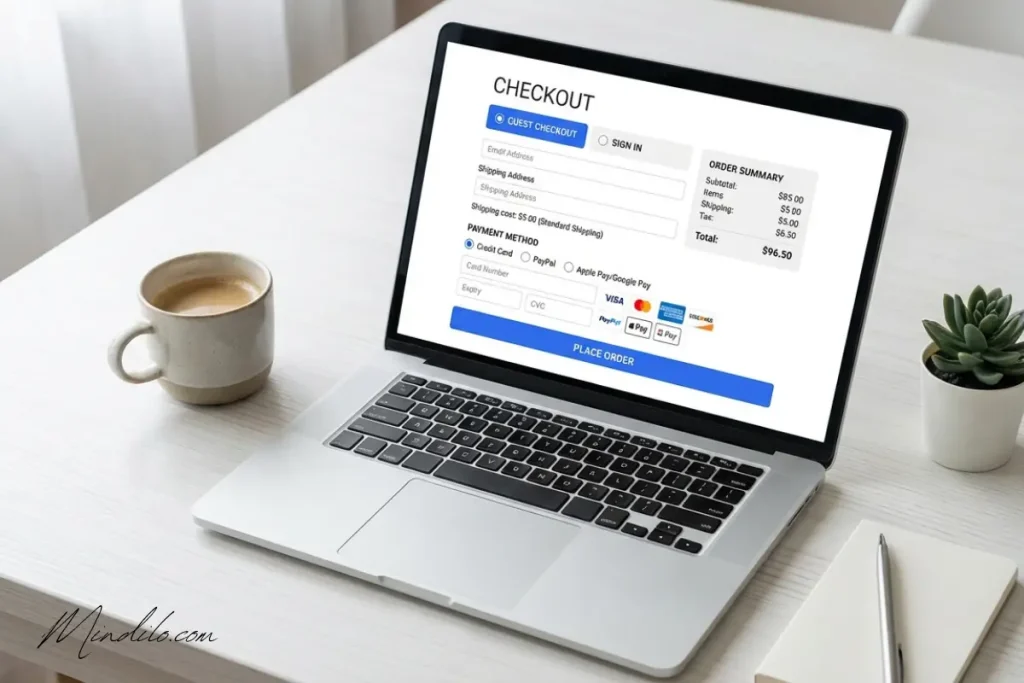
The fix is not necessarily offering free shipping, though that does convert well when it’s operationally viable. The fix is showing all costs as early as possible in the session. If you offer free shipping above a threshold, show that threshold prominently on the product page and in the cart. If there’s a flat shipping rate, display it before the buyer enters payment information.
Transparency here does two things. It removes the surprise that causes abandonment, and it builds trust. A store that’s upfront about costs feels more credible than one that reveals them late in the process.
Guest checkout is not a nice to have
Requiring account creation before purchase is one of the most common and most avoidable checkout conversion killers. From the buyer’s perspective they came to buy a product, not sign up for a service. Being asked to create a password before completing their order introduces a barrier that a meaningful percentage of buyers simply won’t cross.
Guest checkout should be the default path, not a secondary option. Offer account creation as an optional step after the order is confirmed, when the buyer is already in a positive state about the transaction. That’s when they’re most likely to opt in, and you get the same outcome without the friction.
The concern I hear from store owners is that guest checkout means losing customer data for future marketing. That’s a real trade-off but it’s worth remembering that an abandoned checkout produces no data and no revenue. A completed guest checkout produces both a sale and an email address you can use in post-purchase flows.
Trust signals inside the checkout view
By the time someone is entering their payment information they’re at peak anxiety in the buying process. This is the moment when questions like “is this site legitimate?” and “is my card information safe?” are loudest, even for buyers who were confident earlier in the session.
Trust signals placed inside the checkout view answer those questions before they become reasons to leave.
What works here is specific. Display accepted payment method icons (Visa, Mastercard, PayPal, Apple Pay or whatever applies to your store) near the payment field. Show a security badge close to where card details are entered. Include a brief, visible return policy or satisfaction guarantee statement. These elements don’t need to be large or prominent. They just need to be there, in the buyer’s field of view, at the exact moment doubt is most likely to surface.
Consistency in design also matters. If your checkout page looks significantly different from the rest of your store, it creates a subconscious sense of discontinuity that can trigger doubt. Keeping the same fonts, colors, and general visual style throughout the session maintains the sense of continuity that supports trust.
The guide on product page optimization for ecommerce covers trust signal placement in more detail for the pre-checkout stages of the session.
Mobile checkout deserves its own audit
Mobile cart abandonment rates are consistently higher than desktop. The reasons are partly behavioral but they’re also structural. Mobile checkout flows often weren’t designed with mobile in mind. They’re responsive versions of desktop layouts rather than purpose-built mobile experiences, and the difference shows.
On a mobile checkout the form fields need to be appropriately sized for touch input. The keyboard type should match the field: numeric for card numbers, email keyboard for email addresses. The progress indicator should be visible so buyers know how many steps remain. The CTA button needs to be large enough to tap accurately on a small screen without accidentally triggering something else.
One friction point specific to mobile that often goes unaddressed is autofill. If your checkout form doesn’t support browser autofill for name, address, and payment details, mobile buyers face a significantly higher input burden than desktop buyers. Enabling autofill compatibility is a technical detail but one that removes a real source of drop-off on mobile.
Test your mobile checkout with the same discipline you’d apply to any other optimization project. Walk through it on multiple devices. Time the form completion. Note every place where the experience feels awkward. Those friction points are costing you conversions every day.
Frequently asked questions
What’s the single highest-impact change I can make to reduce cart abandonment?
If you haven’t enabled guest checkout, do that first. It consistently produces measurable recovery in abandoned cart rates and requires minimal technical effort on most platforms. After that, audit your shipping cost disclosure. Make sure buyers know the full cost before they reach the payment step. Those two changes address the two most common reasons carts are abandoned.
Should I send abandoned cart emails?
Yes and they should go out quickly. The first recovery email sent within one hour of abandonment typically performs significantly better than emails sent later. A sequence of two or three emails spaced over 24 to 48 hours, with a clear reminder of what was left in the cart and a low-friction path back to checkout, can recover a meaningful portion of lost revenue. This is a standard automation available on most email platforms.
How do I know which step in my checkout is causing the most drop-off?
Set up funnel tracking in your analytics platform. Both Google Analytics 4 and most native Shopify or WooCommerce reporting tools allow you to see where sessions end within the checkout flow. If you see a disproportionate drop between step two and step three for example, you know that’s where the friction is concentrated. From there you can investigate and test specific changes. The guide on A/B testing for ecommerce covers how to structure those tests so you get clean, actionable data.
Checkout is the last conversation your store has with the buyer
Everything that happens before checkout, your product pages, your images, your copy, your trust signals, is building toward this moment. If the checkout experience undermines that work, the sale is lost even when the buyer was genuinely ready to purchase.
Treat checkout optimization as a dedicated system within your store, not an afterthought. Audit it regularly, test changes with discipline, and make trust-building a conscious part of the design. That’s how you convert the buyers who are already close, which is almost always a faster path to more revenue than finding new ones.