
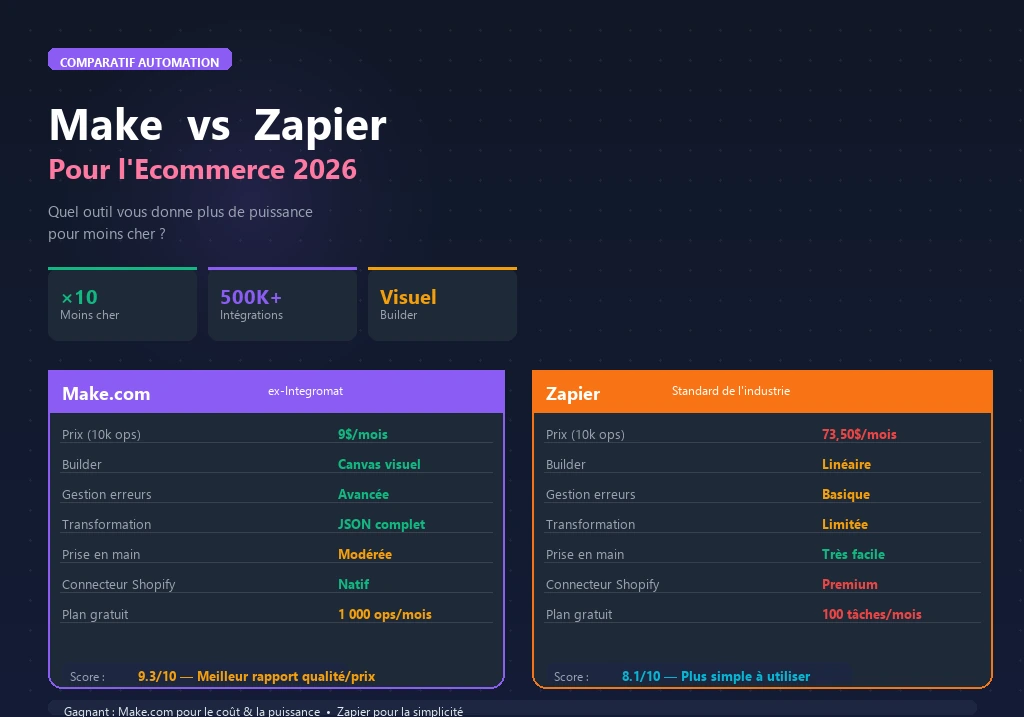

Make vs Zapier for ecommerce: it’s the automation question almost every Shopify and WooCommerce founder hits eventually.
You’ve outgrown manual processes. You know you need automation. Now you’re staring at two platforms that both claim to connect everything and wondering which one actually fits what you’re building. The gap between Make and Zapier is real — in pricing economics, workflow complexity, and how cleanly each platform handles ecommerce-specific data structures from Shopify and WooCommerce.
This comparison skips the feature list padding and focuses on what actually determines the right choice for an ecommerce founder in 2026: workflow volume, complexity requirements, budget, and platform compatibility.
Both tools fit into the broader ecommerce automation stack — the question is where each one belongs in yours.
Quick Comparison Table
| Feature | Make | Zapier |
|---|---|---|
| Best for | Complex multi-step workflows | Simple integrations, beginners |
| Free plan | ✅ 1,000 operations/month | ✅ 100 tasks/month |
| Paid plans from | $9/month (10K ops) | $19.99/month (750 tasks) |
| App integrations | 3,000+ | 9,000+ |
| AI app integrations | 560 AI apps | Growing |
| Workflow complexity | ⭐⭐⭐⭐⭐ | ⭐⭐⭐ |
| Ease of use | ⭐⭐⭐ | ⭐⭐⭐⭐⭐ |
| Shopify integration | ✅ Native | ✅ Native (officially maintained) |
| WooCommerce integration | ✅ Superior | ✅ Good |
| Conditional logic | ✅ Full branching | ✅ Basic (Filters & Paths) |
| Error handling | ✅ Advanced | ⚠️ Basic |
| Cost at 50K ops/month | ~$29/month | ~$299/month |
| G2 rating (2026) | 4.8/5 | 4.5/5 |
What Is Make?
Make (formerly Integromat) is a visual workflow automation platform that connects 3,000+ applications through a drag-and-drop canvas interface. Unlike linear automation tools, Make uses a module-based architecture where each step in a workflow is a discrete module that can be connected, branched, filtered, and looped visually.
That architecture makes a real difference for complex multi-step workflows — the kind involving conditional routing, data transformation, error handling, and parallel processing. You can see the entire scenario laid out on a canvas. You can spot where data goes wrong. And you can build fallback paths when a step fails, which matters when you’re running operational workflows on a live store.
Make’s pricing model bills per operation (each module execution counts), with paid plans starting at $9/month for 10,000 operations. At scale, that works out to approximately 7x more operations per dollar than Zapier. In 2026, Make holds a 4.8/5 rating on G2 for ecommerce automation use cases. It has 560 AI app integrations, native Shopify and WooCommerce modules, and a Make Grid feature that automatically maps relationships between all your workflows.
What Is Zapier?
Zapier is a workflow automation platform connecting 9,000+ applications through a linear trigger-action interface called Zaps. It’s the most widely used automation platform globally — and it earned that position through sheer accessibility. A functional Zap can be configured in under 5 minutes. Zapier’s natural language Zap builder even lets you describe what you want in plain English and builds the automation for you automatically.
The billing model charges per completed task. Filters, paths, and logic steps don’t consume task quota, which makes pricing more predictable than Make for workflows with heavy conditional logic. Enterprise features include centralized admin controls, audit logs, managed permissions, and AI Guardrails for governance — useful for teams that need oversight of what’s running.
In practice, Zapier is the standard choice for ecommerce founders who need quick, reliable integrations between their most-used tools without investing time in workflow architecture. You pick a trigger, pick an action, authenticate your accounts, and you’re live. The breadth of its integration catalog — 9,000+ apps — also means there’s almost nothing it can’t connect.
Pricing: The Real Numbers
This is where the decision often gets made — and where the marketing claims need unpacking.
Make Pricing
| Plan | Price | Operations/month |
|---|---|---|
| Free | $0 | 1,000 |
| Core | $9/month | 10,000 |
| Pro | $16/month | 10,000 + advanced features |
| Teams | $29/month | 10,000 + collaboration |
Worth noting: Make bills for every operation — every module execution, including triggers, filters, and routers. A 5-module scenario consuming 10,000 triggers runs 50,000 operations. At high volume, this math matters and you need to factor it into your planning.
Zapier Pricing
| Plan | Price | Tasks/month |
|---|---|---|
| Free | $0 | 100 |
| Professional | $19.99/month | 750 |
| Team | $69/month | 2,000 |
| Enterprise | Custom | Custom |
Zapier bills only for completed tasks — filters, paths, and conditional logic steps don’t count. This makes Zapier pricing more predictable for workflows with heavy branching.
The Real Cost Comparison
For an ecommerce store running 50,000 automation events per month, Make Teams runs about $29/month while Zapier Professional runs about $299/month. Make is approximately 7–10x cheaper at scale. For high-volume operations, that gap is decisive. For simple, low-volume workflows under 1,000 events/month, the pricing difference is negligible — zapier’s ease of use often justifies the small premium.
Shopify Integration: How Each Platform Handles It
Both platforms have native Shopify integrations, but with meaningful differences in depth.
Zapier + Shopify
Zapier’s Shopify integration is officially maintained and supports 20+ triggers (New Order, New Customer, Order Fulfilled, Product Created, and more) plus 15+ actions. Setup is 3 clicks — select trigger, authenticate, map fields. The best use cases are straightforward: new order creates a Google Sheets record, new subscriber goes to Klaviyo, an order tagged “VIP” sends a Slack notification, a new product gets posted to social media.
Make + Shopify
Make’s Shopify module handles complex data structures more cleanly than Zapier — particularly order line items, which exist as arrays (multiple products per order). Zapier handles arrays with workarounds; Make processes them natively with iterator modules. That distinction shows up in workflows like: new order extracts each line item, updates inventory in Airtable per SKU, sends personalized confirmation with product-specific content, or triggers a multi-step nurture sequence across three tools simultaneously.
WooCommerce Integration
Make has the edge on WooCommerce. WooCommerce’s data structure is more complex than Shopify’s — nested order objects, custom fields, variable products — and Make’s module architecture handles this cleaner than Zapier’s linear builder. For WooCommerce stores running complex automations, Make is the more reliable choice from the start.
Workflow Complexity: Where the Real Gap Shows
This is the core difference between the platforms — not features, but how they handle complexity as it scales.
Simple workflows (1–3 steps): Both work equally well
New Shopify order sends a confirmation email and adds a row to Google Sheets. Either platform handles this in minutes. Zapier is faster to set up. Make is equivalent in reliability.
Medium workflows (4–8 steps): Make pulls ahead
New order checks if the customer is a first-time buyer. If yes, adds to welcome sequence in Klaviyo and tags in Gorgias. If no, updates LTV in Airtable and triggers upsell flow. Zapier can do this with Paths. Make does it more cleanly with visual routing that shows data flow explicitly — and its error handling is more robust. When a step fails in Make, you catch it and route to a fallback.
Complex workflows (8+ steps, loops, data transformation): Make wins clearly
Daily inventory sync: pull all products from WooCommerce, iterate through each SKU, compare against supplier CSV, flag discrepancies, update records in Airtable, send Slack alert for items below threshold, create reorder tasks in Notion. Zapier struggles here. Make handles it natively with iterators, array aggregators, and parallel routing. This is the use case behind Make’s 4.8/5 G2 rating for ecommerce automation.
Which Should You Choose?
Choose Zapier if:
- You’re new to automation and need to move fast
- Your workflows are simple: connect App A to App B, trigger → action
- You need the broadest possible app catalog (9,000+ integrations)
- Your team needs governance features: audit logs, admin controls, user permissions
- You run under 5,000 automation events/month (pricing parity)
Choose Make if:
- You need multi-step workflows with branching, loops, or data transformation
- You run a WooCommerce store with complex order data structures
- You’re processing 5,000+ automation events/month (significant cost advantage)
- You want to incorporate AI steps directly into your workflows
- You need reliable error handling and fallback routing
The hybrid approach
Many ecommerce operations use both: Zapier for quick, simple integrations that need fast setup, Make for the complex workflows that process real operational data. The free plans on both platforms make this feasible without additional cost.
Real Ecommerce Automation Scenarios
| Scenario | Better Tool | Why |
|---|---|---|
| New order → Slack notification | Zapier | 2-min setup, no complexity needed |
| Daily SKU inventory sync across 3 platforms | Make | Iterator modules handle arrays |
| Shopify abandoned cart → Klaviyo tag | Zapier | Simple 2-step trigger-action |
| Order fulfillment → custom per-product email | Make | Conditional routing by product type |
| New subscriber → add to Google Sheet | Either | Equivalent complexity |
| WooCommerce order → multi-system sync | Make | Cleaner WooCommerce data handling |
Frequently Asked Questions
Is Make harder to learn than Zapier?
Yes, initially. Make’s visual canvas requires understanding module connections, data mapping, and scenario architecture. The learning curve is 2–4 hours for basic scenarios and a few days for complex workflows. Zapier can be productive within 30 minutes. If speed-to-automation matters more than long-term cost efficiency, Zapier’s lower barrier matters.
Can I use both Make and Zapier for the same store?
Yes — many ecommerce teams do. Use Zapier for simple, quick integrations (new order to Slack notification) and Make for complex operational workflows (daily inventory sync, multi-step fulfillment routing). Both have free plans that cover light usage.
Does Make integrate with Klaviyo and Omnisend?
Yes. Make has native modules for both Klaviyo and Omnisend, allowing you to trigger email flows, add contacts to segments, and update subscriber properties based on Shopify or WooCommerce events. For how to set up these email flows, see our guide: How to Build Ecommerce Email Flows That Convert.
Which platform is better for AI automation in ecommerce?
Make has 560 AI app integrations and allows AI steps — content generation, classification, data parsing — to be embedded directly into automation scenarios. Zapier is adding AI capabilities but lags on native AI module depth. For AI-augmented workflows, Make is currently stronger. For more on this, see: Best AI Automation Tools for Ecommerce 2026.
What’s the migration path if I start on Zapier and want to move to Make?
There’s no automated migration tool — workflows need to be rebuilt. However, Make scenarios are typically more capable than their Zapier equivalents, so migration usually involves simplifying the architecture rather than replicating it exactly. Most stores complete Zapier-to-Make migration in 1–2 weeks for their core workflows.
Key Takeaways
- Zapier wins on: ease of use, app catalog breadth, governance features, quick setup
- Make wins on: complex workflow logic, WooCommerce data handling, pricing at scale, AI integration depth
- The break-even point: at 5,000+ automation events/month, Make is 7–10x cheaper than Zapier
- For beginners: start with Zapier’s free plan, migrate to Make when complexity or volume demands it
- For WooCommerce stores: Make handles the data structure more reliably from the start
For a complete view of how these tools fit your broader automation stack, see: Best Ecommerce Automation Tools 2026.
For no-code automation options beyond Make and Zapier, see: Best No-Code Automation Tools for Ecommerce Founders.